Write it once. Schedule it everywhere.
Draft a post, pick your channels, and set a time. Orbitwrite publishes each one in the format that network needs.
Cancel anytime before the trial ends.
- Nine networks, one composer
- Edit any channel on its own
- Publishes at the time you set
One post, every account you’ve connected
How it works
Three steps from a blank composer to a post scheduled on every channel you picked.
- 1
Write it once
Draft the post and pick the accounts it goes to. Each account has its own character count and its own preview, so you can see what lands where.
- 2
Edit the ones that need it
Keep every copy in sync, or unsync one account and rewrite it. The other channels stay as they were.
- 3
Set the time
Schedule an exact time, or drop the post into your posting slots and Orbitwrite takes the next one that's free.
What else comes with it
The parts that usually end up in a second tool or a spreadsheet.
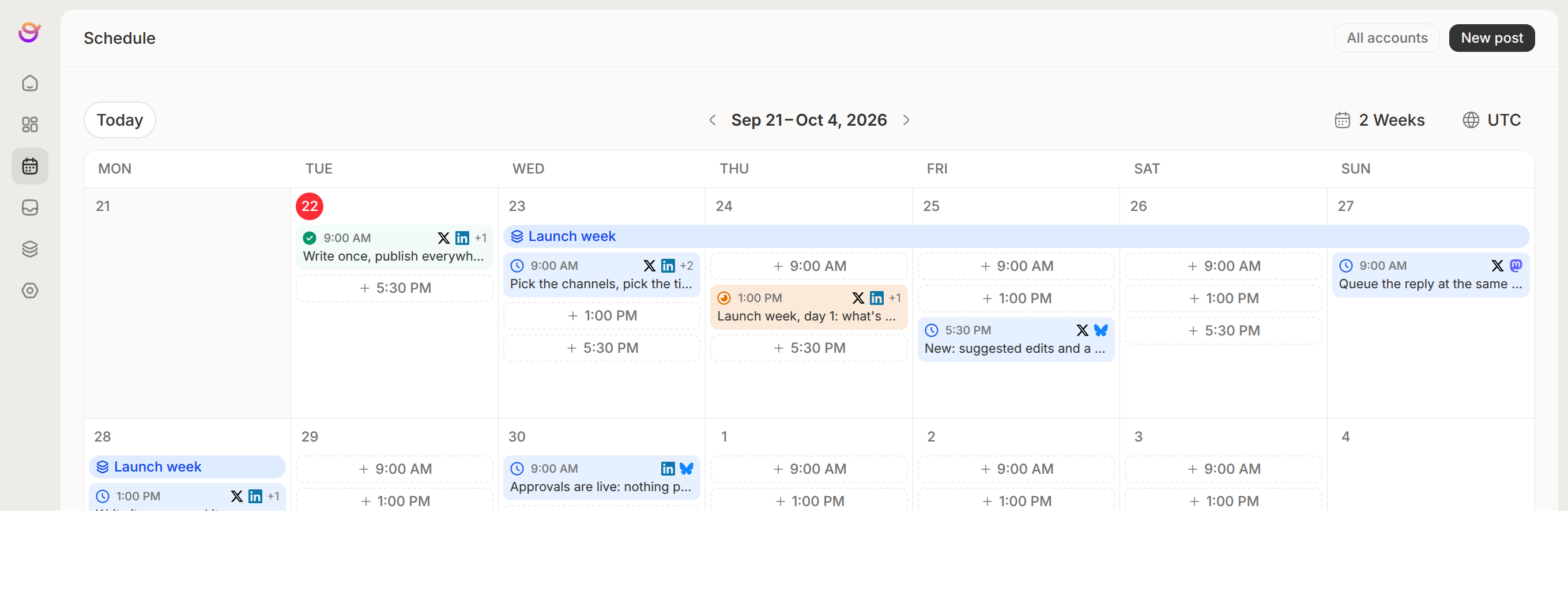
One calendar for the team
Every scheduled post, across every account, on one planner. Drag a post to another day to move it.
Posting slots and a queue
Tell it how often you want to post and smart schedule lays the week out for you. Change any slot you don't like, then scheduling a draft is dropping it in the queue.
Campaigns, not one-off posts
Give Orbitwrite a link or a brief and it drafts a run of posts across the dates you set. None of them publish until the campaign is approved.
Tags across the workspace
Colour-coded tags on any post. Filter the calendar down to one client, one product or one launch.
Comments and suggested edits
Highlight a line and leave a comment, or propose the edit itself. Teammates accept or reject it.
Approvals before it goes live
Send a post for review. Sign-off can block publishing or not, and every change is logged.
Publish status per channel
Every scheduled post shows how far it got on each network, so a failure on one is easy to spot.
Slack and Discord alerts
Get a message in your channel when a post publishes, or when a draft is waiting on review.
Network limits built in
Character counts, media rules and per-network options follow the account, so nothing gets rejected at publish time.