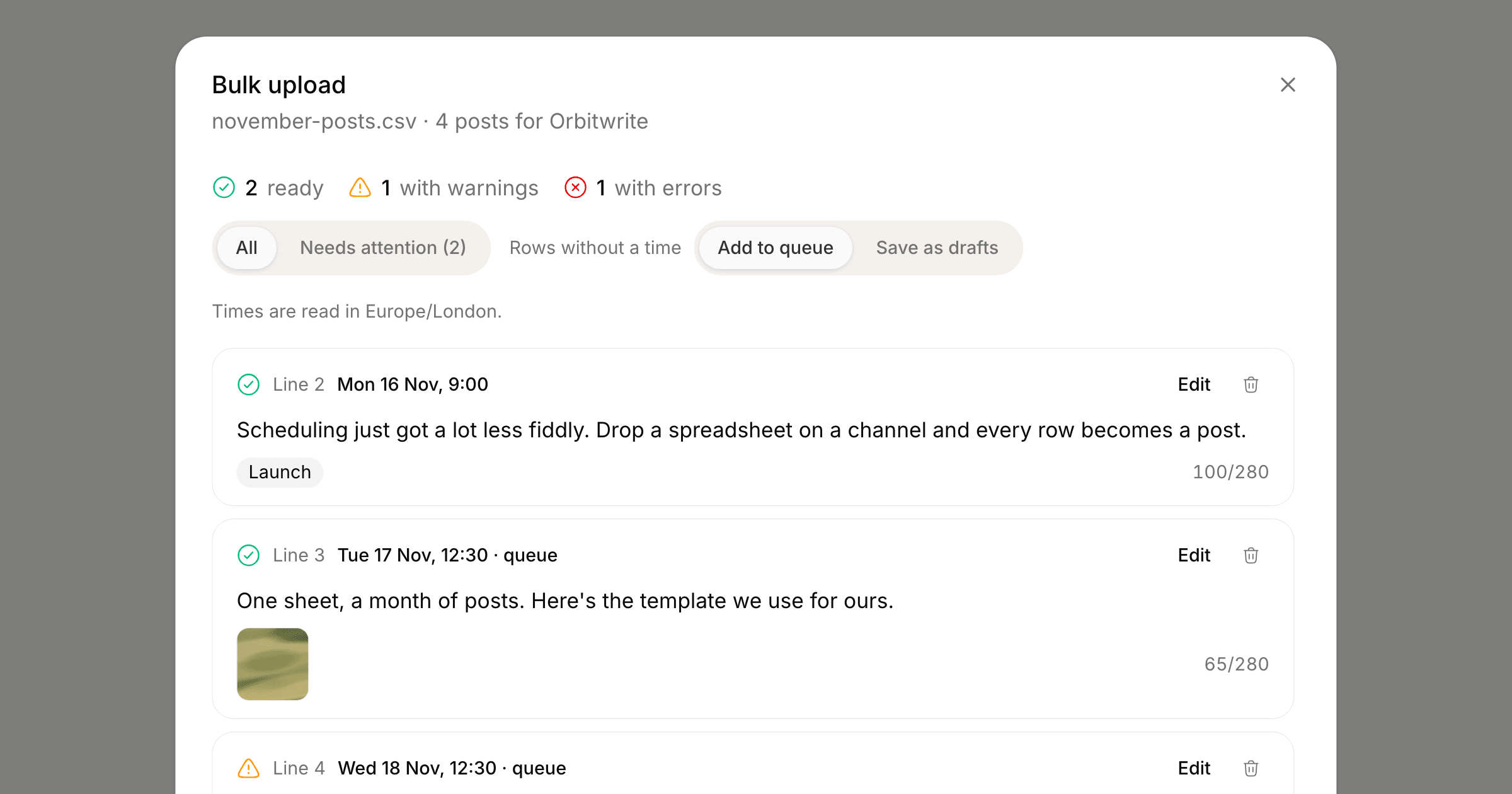
A month of posts for one channel used to mean a month of trips through the composer. Now you can write them in a spreadsheet and upload the file once.
Open Settings, pick the channel under Platforms and choose Bulk upload. The dialog takes a CSV with four columns, text, image_url, tags and posting_time, up to 200 rows. Download template gives you a file with the right headers and three example rows. Headers like "Text" or "Posting Time" are matched loosely, so a sheet exported from Excel, Numbers or Google Sheets works as it is.
Check before anything is scheduled
Every row is listed with the time it will go out, its tags, its image and anything wrong with it, read by the same checks the composer runs. A time is read in the channel's posting timezone. A row without one takes the next free slot in the channel's posting schedule after everything already booked, in the order the rows appear, or you can save those rows as drafts.
Edit a row's text, time or image link in place and the check runs again. Rows with errors (a time that has already passed, a link to a web page where an image was expected, text over the network's limit) are skipped when you import, and the rest are scheduled.
Images are copied into your media library, so the link only has to work while you import. Tags are matched to the workspace's own, and a tag that doesn't exist is left off with a warning. On a plan with approvals, imported posts wait for review the same way posts from the composer do.
Undo
The dialog offers Undo import as soon as it finishes, and the channel's Bulk upload section lists recent imports with an Undo button. Undoing deletes the import's posts that are still waiting to go out. Anything already published stays where it is.
From the API, CLI and MCP
The same import is on the API at POST /api/v1/posts/import (send dryRun: true to check rows first), on the CLI as orbitwrite import posts.csv -c <channel>, in the SDK as orbit.imports.check(), create() and undo(), and for AI agents connected over MCP as import_posts and undo_post_import. The bulk upload guide has the column details.